
I Finally Ran a Paid AI Advertisement: Here’s What I Learned and What You Can Learn Too
I predicted this. In AI SEO 2026, I wrote that paid advertising inside AI systems was not a matter of if, but when. Every major platform that started free eventually turns paid once it collects enough data on its users to sell targeting instead of guesses. Facebook did it. Google did it. YouTube did it. AI search and AI chat platforms were always going to follow the same path, because the economics never change: free access builds the user base, then the data that access generates becomes the product.
On July 22, 2026, that prediction arrived in my inbox. OpenAI sent an email inviting me into the beta of their new Ads Manager. I have lived outside the United States for years, working full time in a role supporting the U.S. government while running AI Visibility Professional in my spare time. That combination meant I had been locked out of most new advertising betas as they rolled out region by region. This one reached me. I opened it, and within the hour I was building my first campaign.
This article is the honest, unfiltered walkthrough of what I did, what I learned, and what nearly every advertiser stepping into this platform is going to get wrong if they move too fast. I am going to show you the actual screens, the actual inputs, and the one decision I made that I believe separates a wasted test budget from a real, data-backed first campaign.
Why This Beta Matters Right Now
Paid advertising inside AI systems is moving away from the exact-match keyword bidding that has defined pay-per-click advertising for two decades, and toward prompt-level, conversational matching instead. Google’s AI Overviews are already surfacing sponsored results inside generative answers, ChatGPT’s sponsored placements match against conversational intent rather than rigid keyword strings, and Perplexity has built its own ad formats around sponsored follow-up questions and research-driven placements. Early indications suggest these AI-native ad surfaces are commanding noticeably higher costs-per-click than traditional search advertising, particularly for high commercial-intent queries, likely because far fewer sponsored slots exist per response than the multiple ad positions available on a traditional search results page.
That scarcity changes the competitive math. On many AI-driven platforms, a single response may carry only one sponsored placement, turning visibility into something closer to a binary win-or-lose outcome rather than a fight for one of several top positions. Businesses that learn to operate inside this new structure early, before the rest of the market catches up, stand to gain a real advantage. This is exactly why I did not wait to test this platform once the opportunity reached me.
(Too Long; Didn’t Read — a quick summary for busy humans and smart machines.)
- OpenAI opened a beta for Ads Manager, and I built and launched my first campaign inside it on July 22, 2026.
- This article walks through every screen of the setup process, using real screenshots from my own account.
- The most important lesson in the entire walkthrough sits inside a field labeled “optional” that most advertisers will skip entirely.
- I also built full conversion tracking from scratch, because a campaign without data is just a guess with a budget attached.
- As the founder of AI Visibility Professional and author of AI SEO 2026, this walkthrough applies the PAID framework (Purpose, Audience, Interface, Data-Driven Decisions) to a live, real-money campaign rather than a theoretical one.
The following definitions are adapted from the AI Visibility Definition Library.
Paid AI Visibility: The use of advertising within AI-driven platforms to increase the likelihood that a business is introduced, referenced, or recommended within AI-generated responses.
PAID Framework: A four-part system for paid AI amplification, Purpose, Audience, Interface, and Data-Driven Decisions, designed to increase visibility within AI-driven platforms by aligning advertising with how AI systems recommend and introduce solutions.
Capital Allocation (AI Ads): The strategic decision-making process of where, when, and how much to invest in paid AI visibility, based on performance, intent, and expected return.
Context Hints: Plain-language descriptions, set at the ad group level, that tell an AI advertising system the conversations, topics, or situations where a product or service may be relevant. Context hints guide relevance matching but are not exact-match targeting rules.
Conversion Pixel: A small script installed on a website that reports back to an advertising platform when a visitor takes a meaningful action, such as completing a purchase, so that ad performance can be measured against real business outcomes rather than clicks alone.
A Quick Word on PAID Before We Begin
Before walking through the setup itself, it helps to know the lens I built this campaign through. AVP teaches Paid AI Visibility through the PAID framework:
- PURPOSE: Why should capital enter the system at all?
- AUDIENCE: Who should be influenced, and just as importantly, who should be excluded?
- INTERFACE: Do you actually understand the mechanics of the platform before you spend a dollar in it?
- DATA-DRIVEN DECISIONS: Can you measure what happened once you did?
Everything below happened inside that framework, whether I was consciously naming it at the time or not. At the end of this article, I come back to PAID directly and show exactly where each pillar showed up in this campaign.
Setting Up the Account
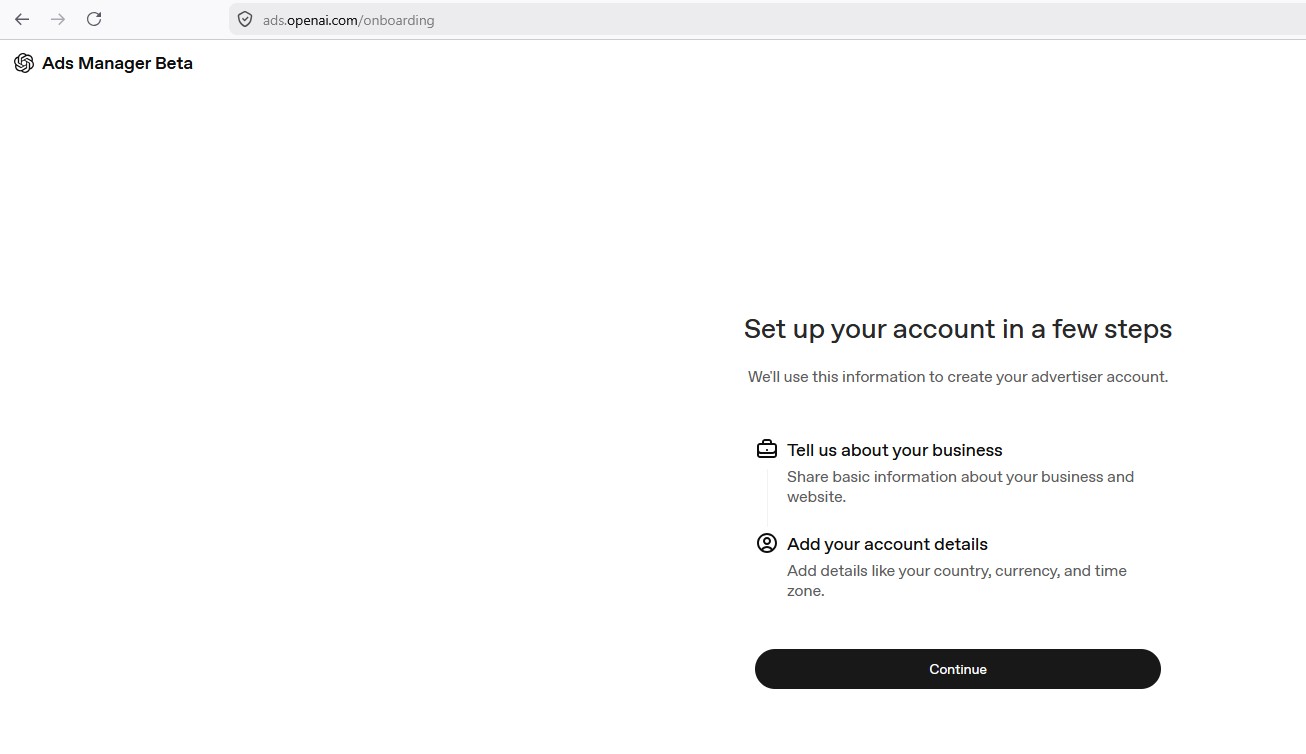
Getting into OpenAI’s Ads Manager beta starts with a short two-part setup: Tell us about your business, and Add your account details. Nothing complicated here, just the entry point into everything that follows.
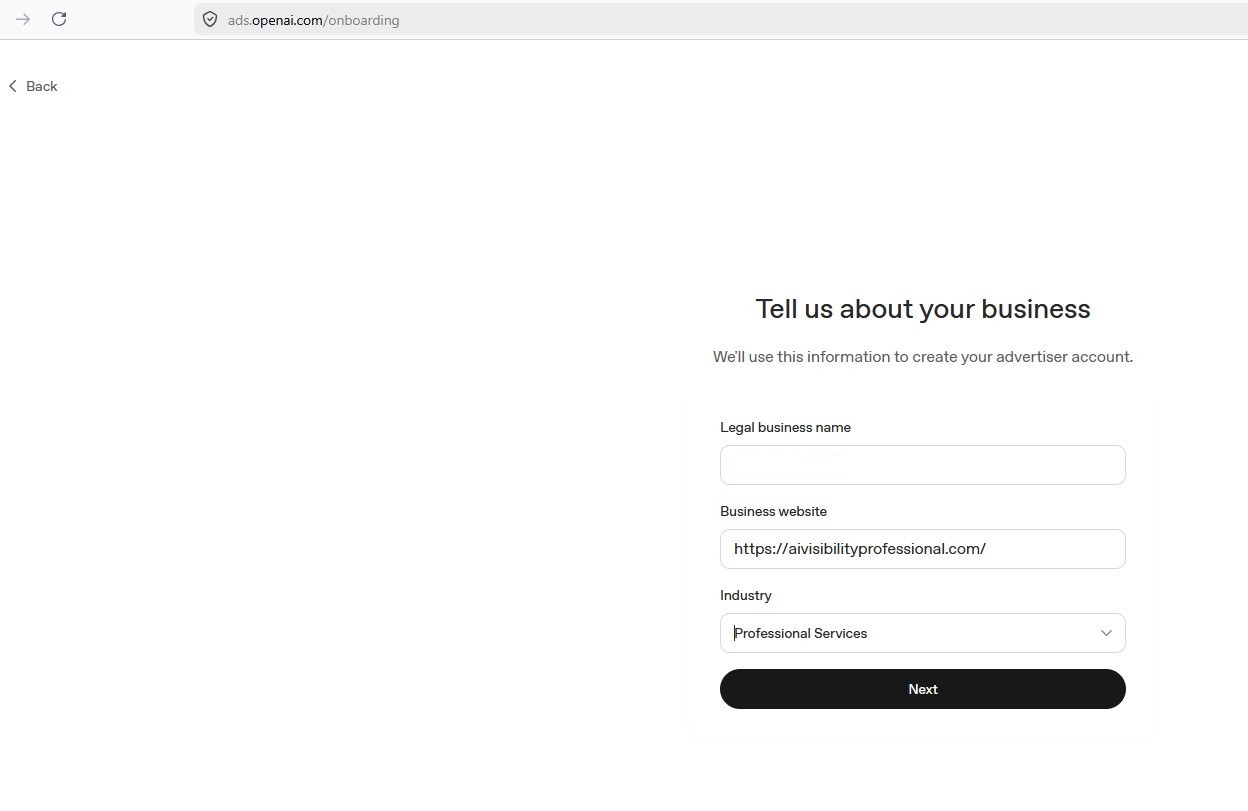
The first real screen asks for your legal business name, your business website, and your industry from a dropdown. I entered AI Visibility Professional’s website and selected Professional Services as the closest fit. This is standard advertiser-account information, but it matters, because it is what OpenAI uses to understand the nature of your business before you ever write an advertisement.
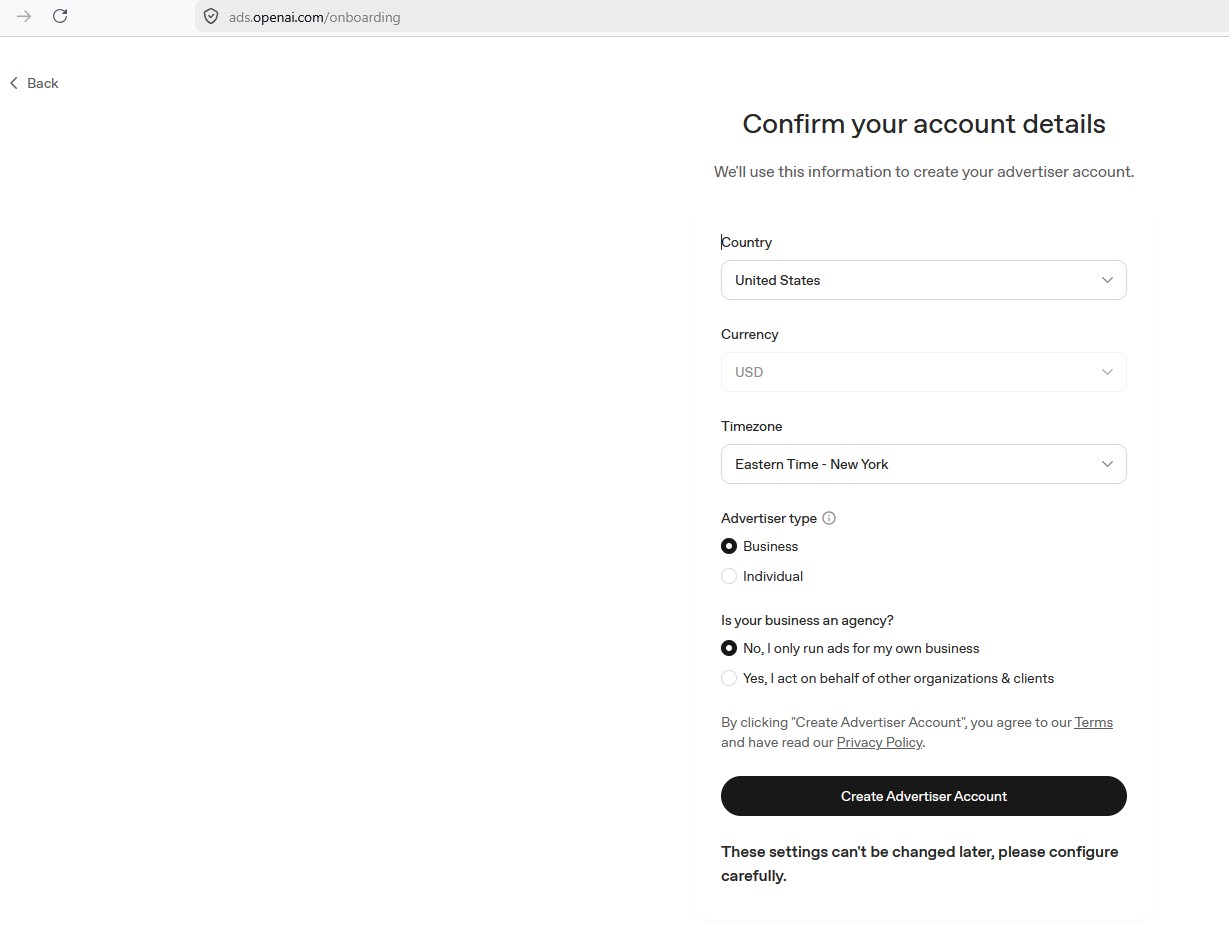
Next comes account confirmation: country, currency, timezone, and a choice between Business and Individual as your advertiser type. There is also a question worth pausing on: is your business an agency? I selected No, I only run ads for my own business, since I am not managing campaigns on behalf of other clients through this account. If you are a marketing professional running ads for clients, you would select the agency option instead, which changes how OpenAI structures your account permissions. A note directly on this screen deserves attention: these settings cannot be changed later. Configure carefully before clicking Create Advertiser Account.
Building the First Campaign
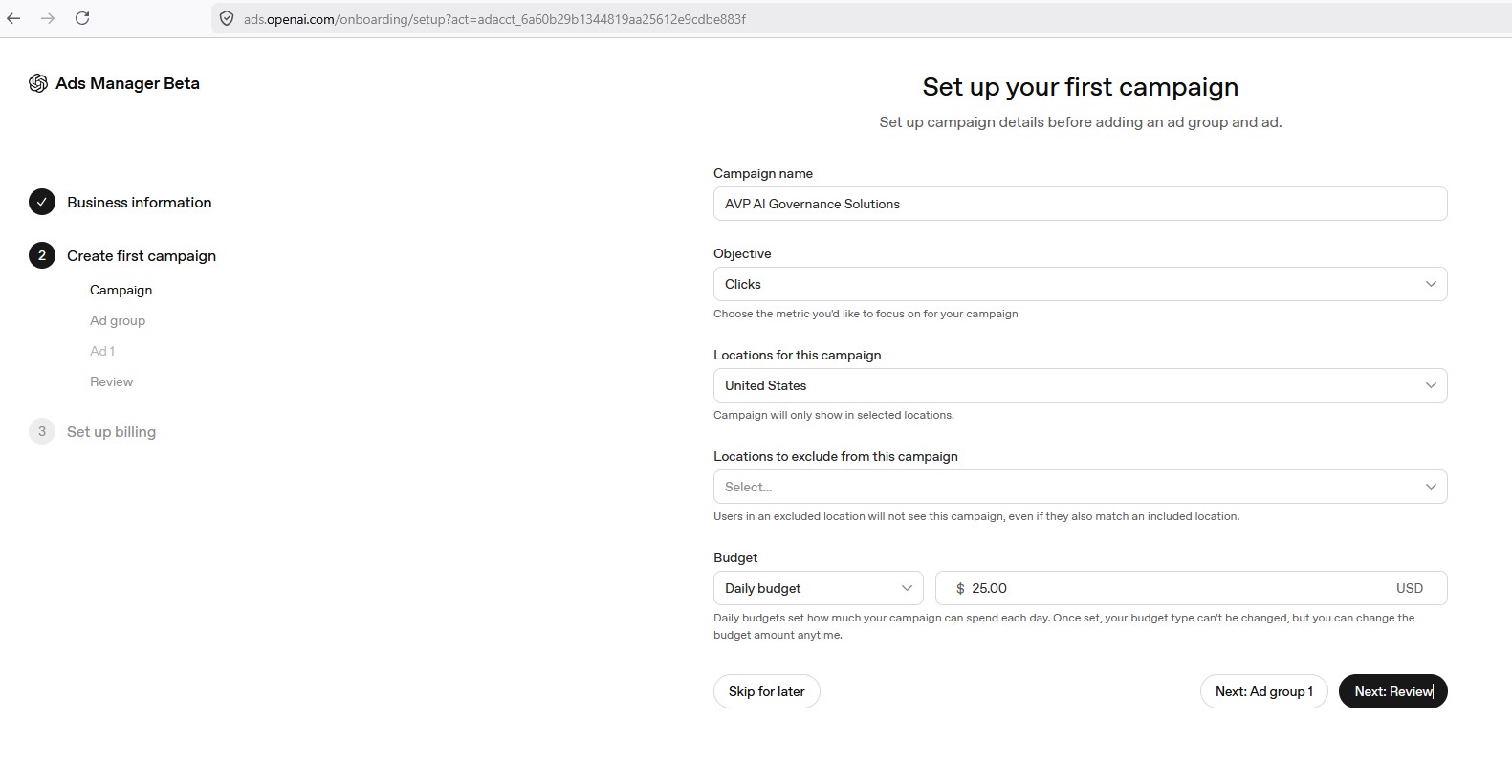
With the account created, campaign setup begins. Here you name the campaign, choose an objective from a dropdown (Reach, Clicks, or Conversion, with Conversion marked as coming soon), and set your locations. This is where I want to correct a mistake I nearly made in my own planning before I ever opened this screen. I assumed, incorrectly, that location targeting inside this beta worked like Google or Meta, where you can drill into cities, regions, or a radius around a specific point. It does not. Locations here are set entirely by country. You can include or exclude countries, but nothing more granular than that. As of this writing, the beta supports the United States, Canada, Australia, and New Zealand. If you need finer targeting than country level, you cannot get it from the location field. You have to build it into your context hints instead, which becomes important a few screens from now. This screen also sets your budget: Daily or Total, with a documented $25 per day minimum for the daily option. I set mine to Daily at $25, since a daily cap lets you watch performance and pause quickly if something looks wrong, rather than committing an entire budget upfront on an unproven channel.
The Screen That Matters Most
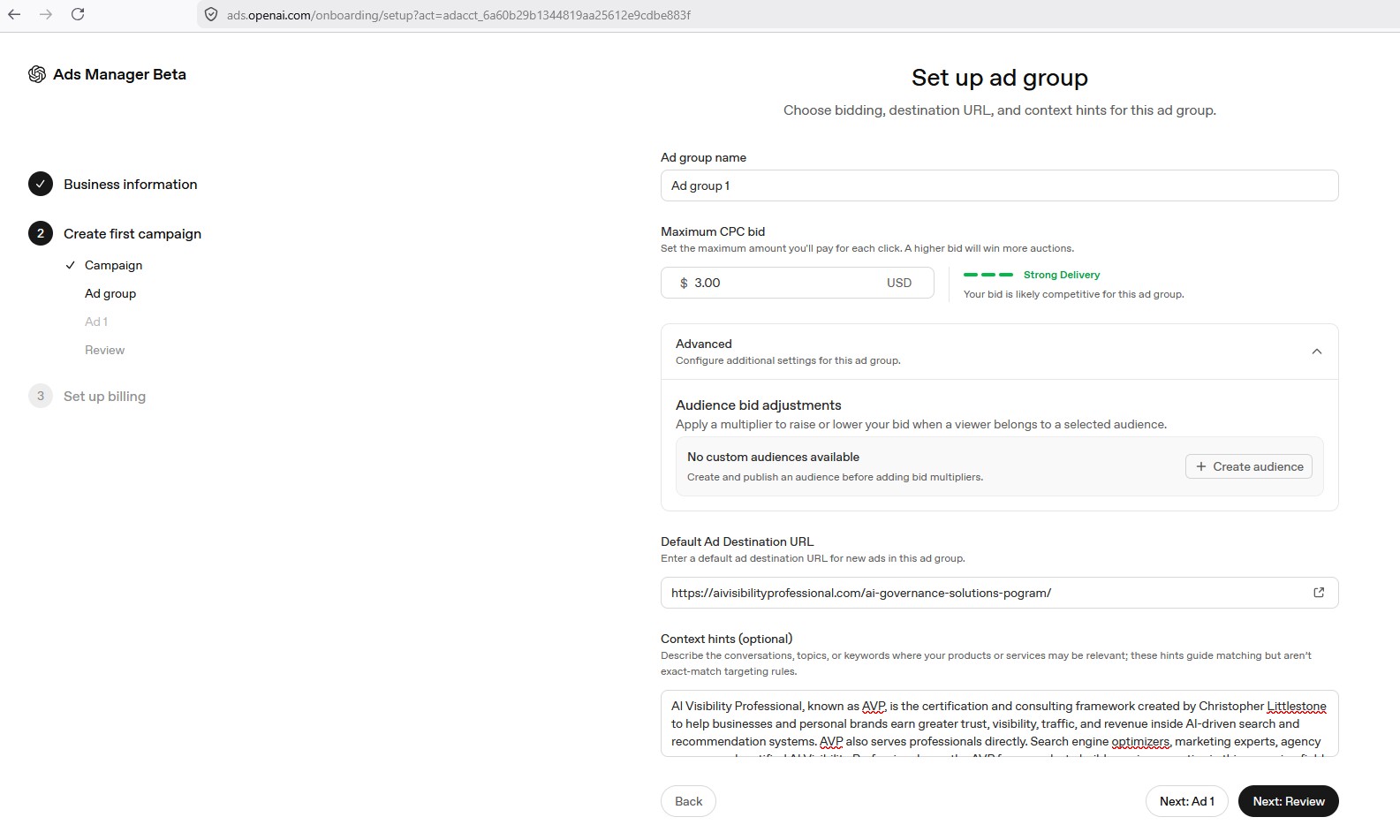
This is the screen where nearly every advertiser using this platform is going to make the same mistake, and it is the single most important lesson in this entire article.
The ad group setup screen asks for a maximum CPC bid (I set mine at $3.00, and the platform gave me a live “Strong Delivery” indicator confirming that bid was competitive), a Default Ad Destination URL, and an Advanced section containing Audience Bid Adjustments, which let you raise or lower your bid when a visitor matches a custom audience you build separately from uploaded, hashed customer data.
Then there is the field labeled Context hints (optional).
That single word, optional, is doing enormous, quiet damage to advertisers who take it at face value. Here is why. This platform has no keyword-exact-match targeting system. There is no equivalent to bidding on search terms the way you would in Google Ads. Country-level geography is the only location control you have, as I just described. That means this text field, labeled as something you can skip, is functionally the single most powerful targeting instrument available to you on the entire platform. Skip it, and the system is left to infer your relevance entirely from your landing page and business information, with no input from you on the matter. Fill it in properly, and you are doing the actual audience-shaping work that other advertising platforms hand you through keywords, interests, and demographic filters.
I did not skip it. I wrote a full introduction to AI Visibility Professional, an explanation of our three frameworks, a specific narrowing into AI Governance Solutions as the subject of this particular campaign, and then, deliberately, two distinct audience instructions: who this should reach, and just as forcefully, who it should not. I named the exact kind of searcher I wanted excluded, people looking for free AI governance templates, free policy documents, free SOPs, since that traffic would never convert against a paid offer and would only waste the budget I had committed to this test.
Published documentation for this platform states a 280-character limit on this field. I pasted in roughly a thousand words. The field accepted it without rejection, without truncation, and without any visible warning. Whatever the actual production limit is, it is considerably higher than what is publicly documented. The lesson here is not just about character counts. It is about never trusting published documentation over what the live interface in front of you actually does. Platforms this new frequently ship ahead of their own written guidance.
Optional fields are still targeting decisions.
If you take nothing else from this article, take this: leaving that field blank is not a neutral choice. It is a default you did not choose to make, on the one lever this platform gives you that most resembles real audience control.
Building the Advertisement
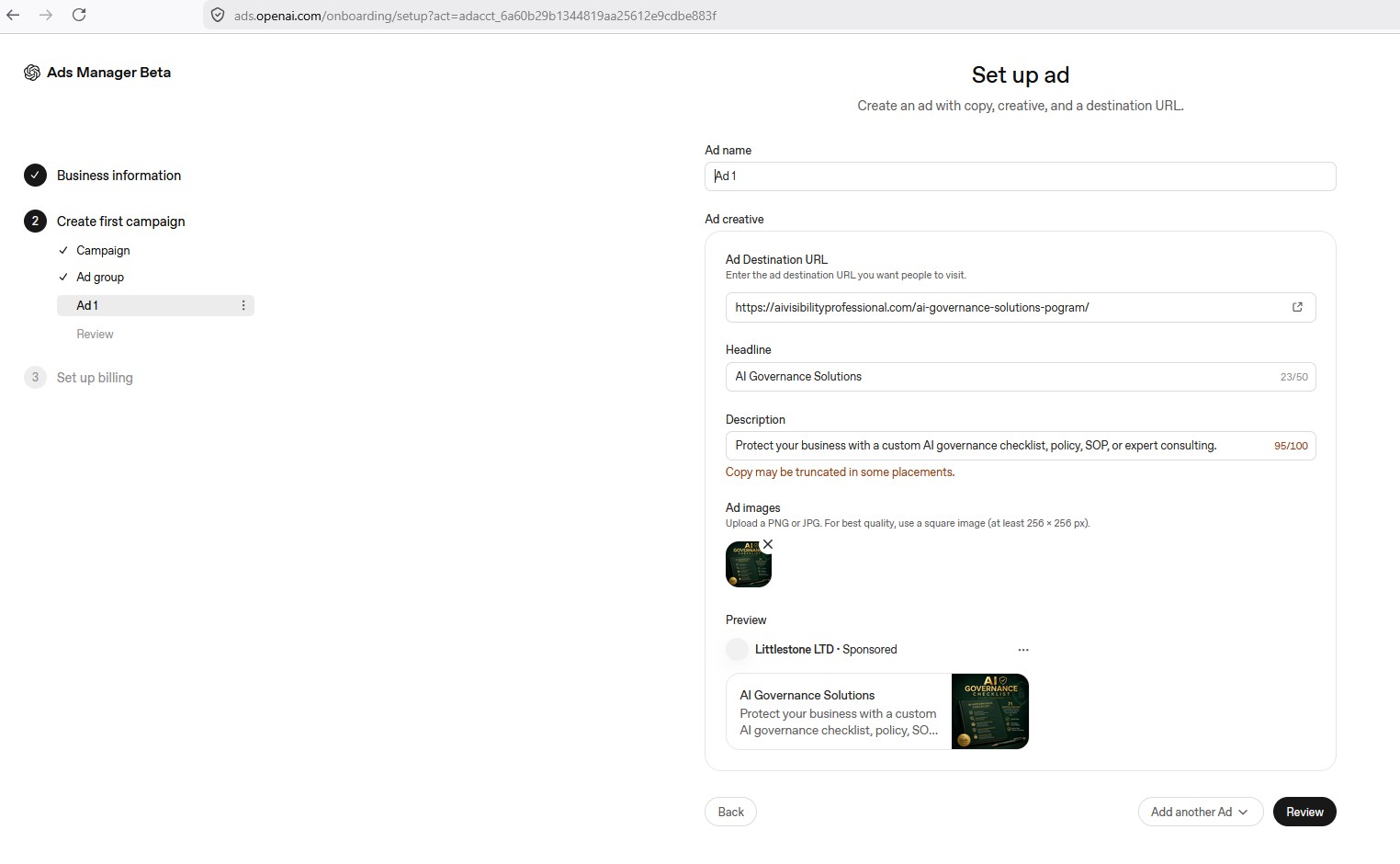
With the ad group configured, the next screen builds the advertisement itself: an ad name, the destination URL, a headline (50 characters), a description (100 characters, with a warning that copy may be truncated in some placements), and an image upload. There is no video creative option at this stage, only static images, which is a meaningful difference from the ad formats most advertisers are used to on Google or Meta. A live preview shows exactly how the advertisement will render, including your business name and a “Sponsored” tag, before you commit to anything.
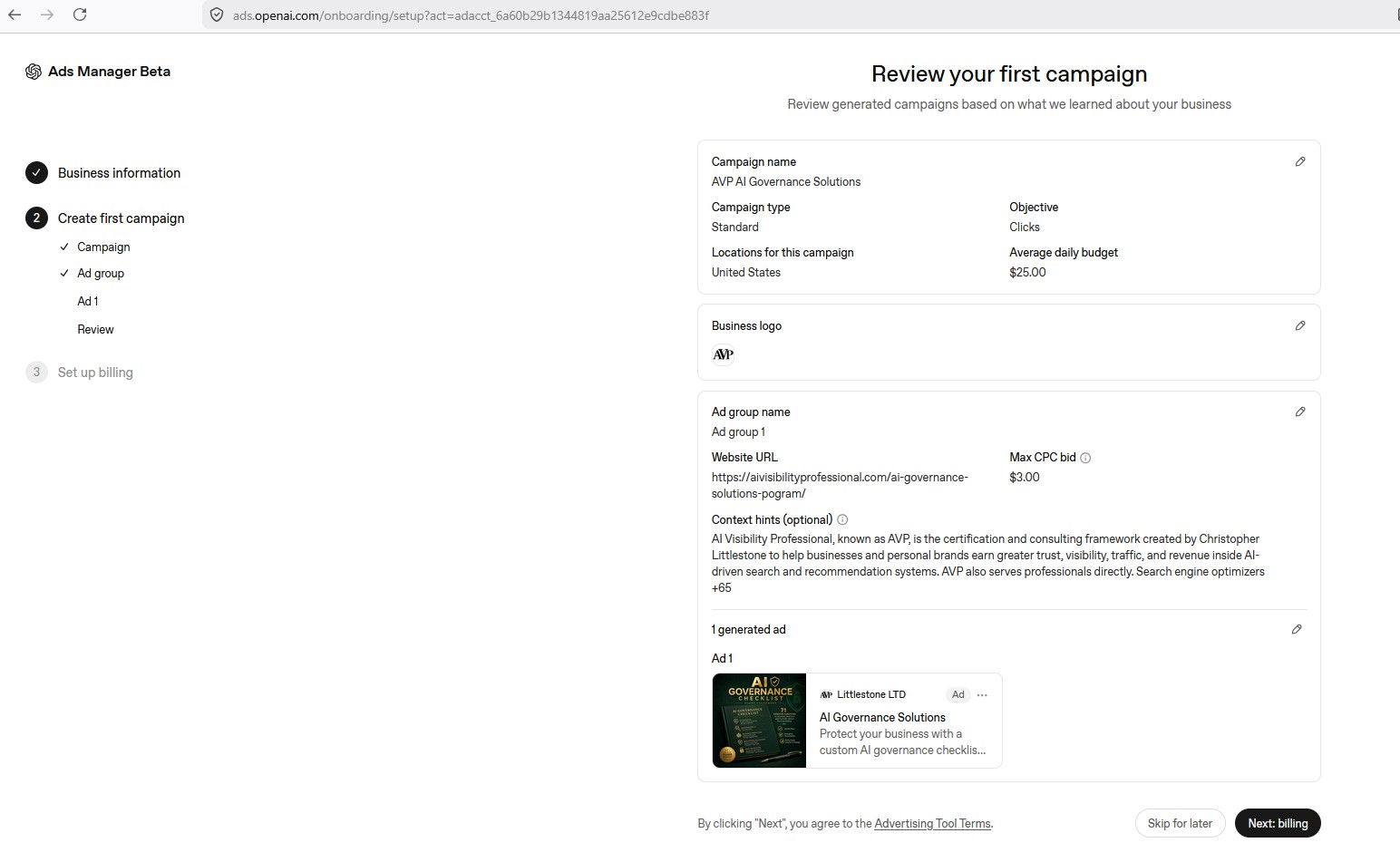
The review screen consolidates everything: campaign name, objective, locations, budget, business logo, ad group name and URL, your context hints, and the generated ad preview, all in one place before you move to billing. This is your last chance to catch a mistake before spending starts.
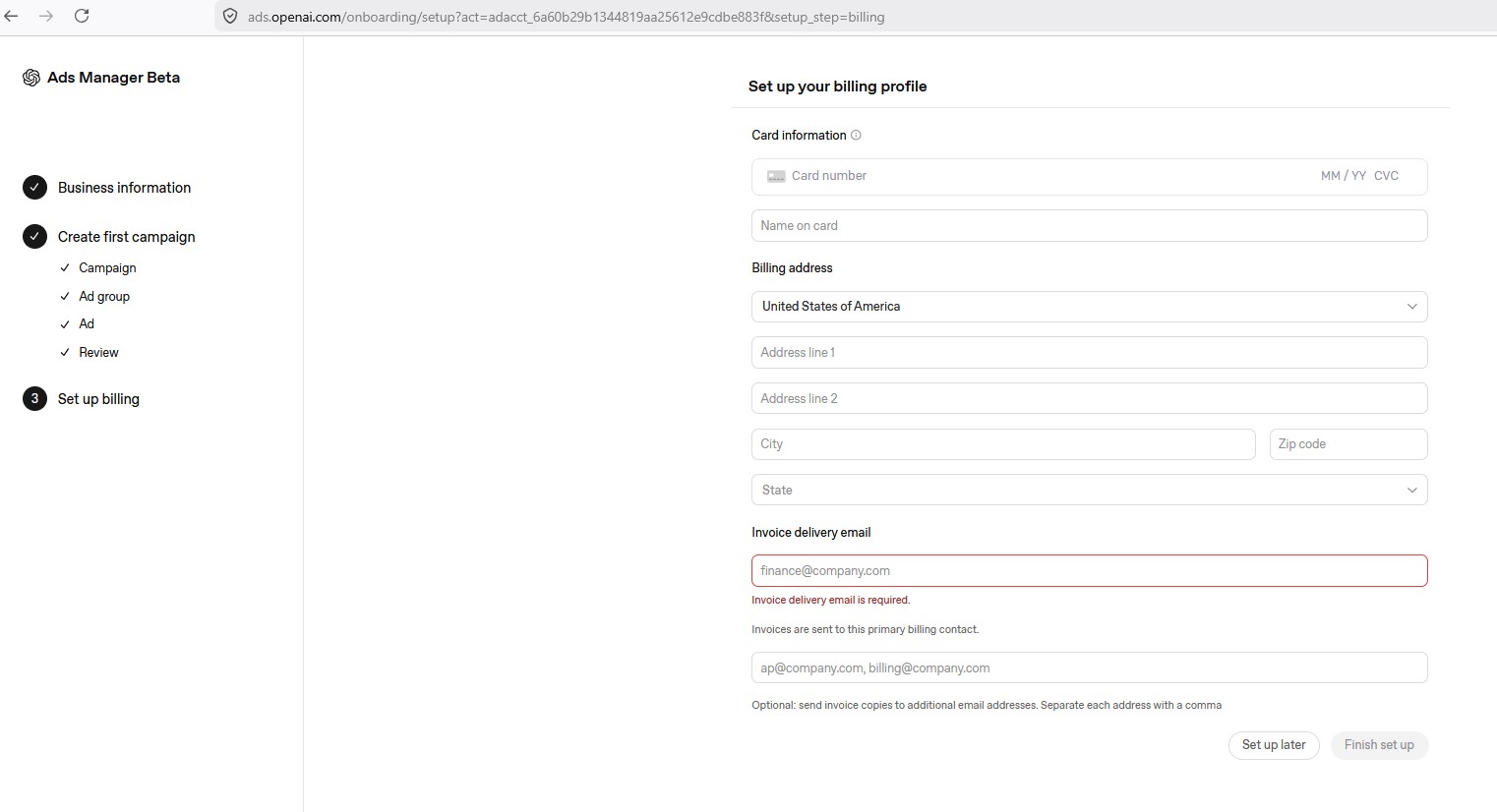
Billing setup is straightforward: card information, a billing address, and a required invoice delivery email, with an optional field to CC additional finance addresses separated by commas. Once this is submitted, the campaign is live.
From Setup to Measurement
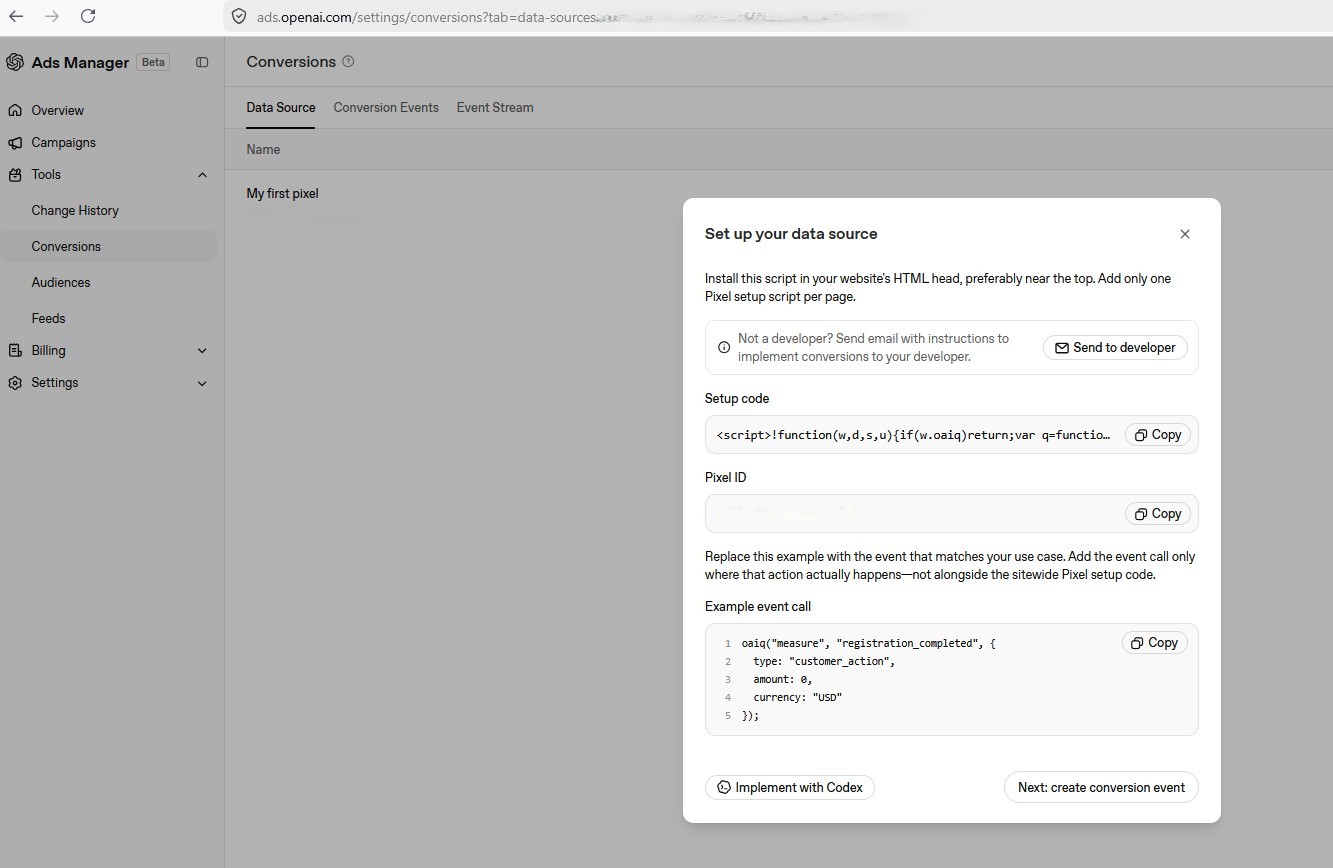
Here is where the walkthrough shifts from setup to something more important: measurement.
A campaign without conversion tracking is not a campaign. It is a guess with a budget attached. Clicks and impressions tell you whether people saw and engaged with your advertisement. They tell you nothing about whether any of it turned into an actual sale. So before I let this campaign run unsupervised, I installed OpenAI’s tracking pixel sitewide, in the header of every page on my website, and then built a second, separate event specifically for completed purchases, tied to my real WooCommerce order totals rather than a hardcoded placeholder number. This is the Data-Driven Decisions pillar in its most literal form: without it, everything downstream is instinct, not evidence.
Applying PAID to This Campaign
Looking back at this entire process through the PAID framework, four moments stand out clearly.
Purpose showed up before I ever opened Ads Manager. The decision to run a cheap, $25-a-day test aimed at an educational article rather than a direct push toward a $1,000 or $3,000 offer was a Purpose decision. Cold traffic on a brand-new platform, with zero prior data, has no business being pointed at your highest-ticket item on day one.
Audience showed up entirely inside the context hints field. Writing who this should reach, and explicitly, aggressively, who it should not, is the clearest real-world example I can give of the Audience doctrine at AVP: influence precisely, exclude aggressively.
Interface showed up as the corrective mistake I almost made, assuming this platform worked like Google or Meta on geography, and the deeper lesson underneath it: an “optional” field that is actually the most consequential targeting decision on the entire platform. Interface is not a minor technical detail. It is the difference between using a system correctly and wasting a budget confidently.
Data-Driven Decisions showed up the moment I stopped trusting clicks as a measure of success and built real conversion tracking, tied to actual order values, before letting this campaign run unsupervised.
Paid AI visibility is not advertising in the way we have understood the word for the last twenty years. It is capital allocation inside a system that is still being built in front of us.
Summary Table
| Mechanic | OpenAI Ads Manager (Beta) | Google / Meta Ads |
|---|---|---|
| Objective options | Reach, Clicks (Conversion coming soon) | Reach, Clicks, Conversions, and more, all available now |
| Geographic targeting | Country-level only | Country, region, city, and radius targeting |
| Creative format | Static image only | Static image and video |
| Targeting mechanism | Plain-language context hints (no exact-match keywords) | Exact-match, phrase-match, and broad-match keywords, plus interest/demographic targeting |
| Minimum budget | $25 per day (daily budget option) | Varies by platform and campaign type |
Bad Example / Good Example
Consider two advertisers approaching the exact same OpenAI Ads Manager beta, with the exact same product to sell. The difference between them comes down to how seriously each one treats the platform’s default settings, not how much money either one has to spend.
Bad Example
An advertiser opens the ad group screen, sees “Context hints (optional),” and leaves it blank, assuming it is unnecessary. They point their first campaign directly at their highest-priced offer, spend their entire test budget in two days, and conclude the platform “doesn’t work,” without ever measuring whether a single visitor completed a purchase.
Good Example
An advertiser treats every field on this platform as a targeting decision, whether it says optional or not. They start with a modest daily budget aimed at an educational asset rather than a high-ticket offer, write a detailed context hint that names both who to reach and who to exclude, and install conversion tracking before running a single dollar of spend. When the campaign concludes, they have real data to decide whether to scale, adjust, or stop, rather than a guess dressed up as a decision.
Frequently Asked Questions
Is this beta open to everyone?
Yes. I received an email invitation from OpenAI directly, but the Ads Manager onboarding URL itself is open to anyone who wants to sign up and create an advertiser account. An invitation is not required to begin.
What’s the minimum ad spend to test this platform?
As of today, the documented minimum is $25 per day for a daily budget. A total-budget option also exists if you prefer to cap overall spend across a set campaign window rather than committing to a recurring daily amount.
Do I need a developer to set up conversion tracking?
Basic pixel installation can be done without a developer using a site’s existing header/footer code tools, since it is a single script pasted into your site’s header. Dynamic order-value tracking tied to a shopping cart platform, so that the real purchase amount is reported automatically rather than a hardcoded number, benefits from someone comfortable with a small PHP snippet.
Can I target specific cities or regions?
Not through the location field, which is country-level only. Finer targeting has to be built into your context hints instead, describing the specific audience, situation, or need you want to reach in plain language rather than relying on geographic filters.
Does this platform support video ads?
Not at this stage. Ad creative is currently limited to static images, which is a meaningful difference from the video ad formats available on platforms like Google and Meta. This is worth factoring into your creative planning until the beta expands.
How is this different from running ads on Google or Meta?
The biggest differences are the absence of exact-match keyword targeting, the lack of sub-national geographic targeting, and the absence of video creative at this stage. Instead of keywords, the platform relies on plain-language context hints to guide relevance, and audience refinement beyond geography currently depends on uploading your own customer data rather than selecting interest categories.
Should I send ad traffic straight to a product page or to an article first?
For cold traffic on a new platform, sending people to an educational article first, with a clear path to your product at the end, tends to perform better than sending them directly to a purchase page. This gives the AI system’s audience context to build trust before asking for a transaction, which matters more here than it does on platforms where the visitor already arrived with strong existing purchase intent.
What happens if I skip conversion tracking entirely?
You will still see clicks, impressions, and spend, but you will have no way to know whether any of that activity resulted in an actual sale. This makes it impossible to judge whether the campaign is profitable, and it removes the evidence you would need to decide whether to scale, adjust, or stop the campaign with any confidence.
How long should a first test campaign run before I draw conclusions?
At $25 a day, it typically takes at least a week to ten days to gather enough clicks and conversion data to draw a meaningful conclusion, rather than reacting to a single strong or weak day. Judging results after only one or two days risks making a decision based on noise rather than a real pattern.
Is the 1,000-word context hint result something I should count on for my own account?
Treat it as something to test yourself rather than something to assume will hold. Published documentation cited a 280-character limit, and my account accepted far more than that without rejection, but platform behavior in a beta can change without notice. Confirm what your own account’s field actually accepts before relying on a long context hint in production.
Key Takeaways
- Location targeting on this platform is country-level only; there is no city, region, or radius targeting.
- The “optional” context hints field is the single most important targeting lever on the platform, since there is no keyword-exact-match system.
- Live platform behavior can outpace published documentation; test the actual field rather than trusting the written character limit.
- Conversion tracking should be built before a campaign runs unsupervised, not after.
- A cheap, educational-content-first test protects budget better than pointing cold traffic at a high-ticket offer.
About the Author
Christopher Littlestone is the founder of AI Visibility Professional (AVP) and author of AI SEO 2026, which held the #1 recommended position for “best AI SEO book” simultaneously across ChatGPT, Gemini, Bing Copilot, and Perplexity in April 2026. He created the FOUND, PAID, and GUARD frameworks and holds a 4.9 Trustpilot rating across more than 4,000 students trained through his prior instructional work.
Final Thoughts
Optional fields are still targeting decisions.
Every new advertising platform has a version of this moment: a field, a setting, a default, that looks unimportant because the interface tells you it is. The businesses that treat this platform seriously, from day one, at $25 a day, will be the ones with real data when the rest of the market shows up. That is the actual advantage of moving early. Not the platform being new. The discipline of taking it seriously while everyone else assumes optional means unimportant.

Tools
Professional tools and audits that maximize AI visibility, attract qualified customers, and increase revenue.

Articles
Clear, standards-driven education explaining how organic and paid AI visibility works in real-world AI systems.

Courses
Coming Soon - Sign up for our AVP Newsletter to Learn More / Join the Waiting List

Certification
Coming Soon - Sign up for our AVP Newsletter to Learn More / Join the Waiting List